Document Understanding with GOT: OCR-2.0 via a Unified End-to-end Model
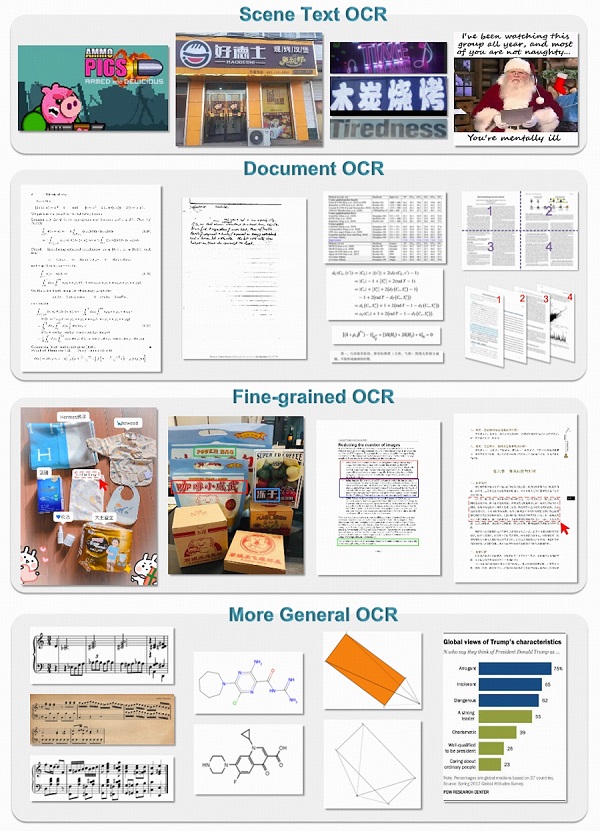
Table of contents
We have seen both pipeline-based and OCR-based methods for document understanding. In our exploration of document parsing models, we first experimented with PaperMage, DONUT, and Nougat before moving to GOT. Each offered unique approaches to document understanding, but GOT provides the most comprehensive solution with its end-to-end architecture.
Let’s see how:
Overview
Traditional OCR (call it OCR-1.0) is a multi-step pipeline: detect text regions, crop them, run a recognizer, stitch results. That works, but it’s brittle and hard to extend to other “characters” like math, tables, sheet music, chemical SMILES, or charts.
The paper proposes OCR-2.0 and introduces GOT (General OCR Theory model) — a single end-to-end encoder-decoder model that learns to read many kinds of optical signals directly from images. GOT is intentionally compact (about 580M parameters total) and is built from:
- a high-compression vision encoder (≈80M params) that turns a high-res image into a stream of image tokens, and
- a long-context language decoder (≈0.5B params) that converts those tokens into text or formatted outputs (Markdown/LaTeX/TikZ/SMILES/Kern, etc.).
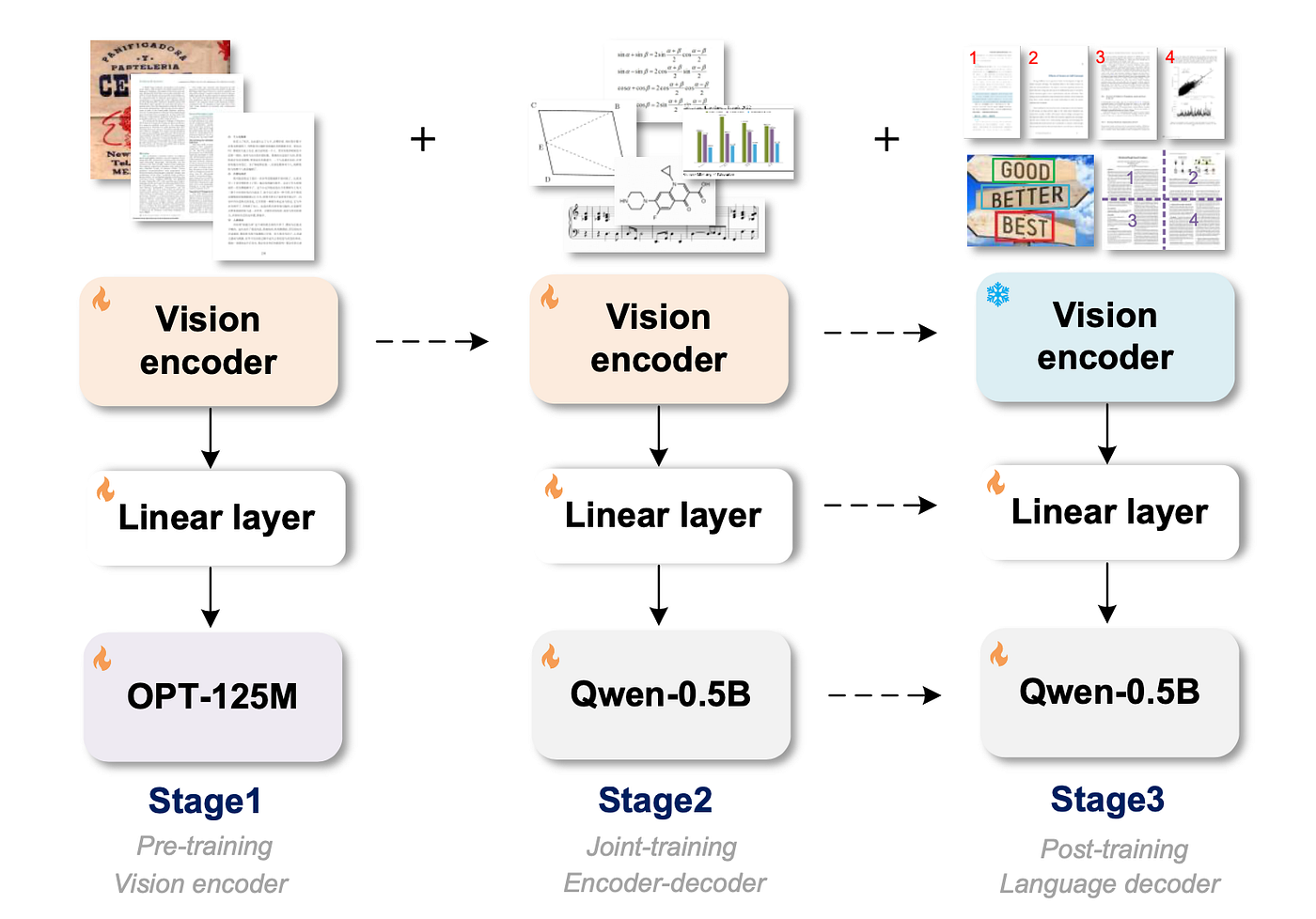
The authors emphasize three training steps ( pretrain encoder → joint train encoder + decoder → post-train decoder ) and a set of synthetic data engines that make the model general and practical.
Stage 1: Pretraining the vision encoder
Goal: teach the encoder to compress visual pages / slices into tokens that capture text and other visual symbols reliably.
Design:
- They pick VitDet (base) as the encoder (local attention helps with high-res images). The encoder is ~80M parameters.
- Inputs are resized to
1024×1024, then the encoder compresses that into image tokens of size256 × 1024. These tokens are then projected into the language model embedding space.
Data for encoder pretraining:
-
About 5 million image–text pairs total:
- 3M from scene text images (English + Chinese) — pseudo-labeled with tools like PaddleOCR.
- 2M from document images (PDF style) — text extracted from Common Crawl PDF files, plus many crop/slice examples so encoder sees both full pages and small text regions.
Pretraining:
- To save compute and let the encoder learn quickly, they attach a small decoder (OPT-125M) during pretraining so gradients flow to the encoder, but they keep the focus on learning visual representations for OCR tasks. They train with AdamW, batch sizes and schedules that favor fast encoder learning.
The encoder becomes a compact, general visual front end that works for both scene text and document text, and produces a token stream the decoder can work with efficiently.
Stage 2: Joint-training the encoder and decoder
Teach the combined system to turn the encoder’s visual tokens into correct, readable text — and to support many output styles.
- Replace the tiny decoder used in stage 1 with a larger language decoder (the authors use Qwen-0.5B). This decoder has much more capacity to generate long, formatted outputs.
- Joint-train the encoder+decoder on multi-task OCR data that includes not just plain text, but also math formulas, tables, charts, sheet music, SMILES (chemical strings), and geometric shapes. They also include multi-page examples so the decoder learns long-context outputs.
Training notes (simple numbers):
- In joint training they increase the maximum token length (allowing longer outputs) and train with similar optimizer settings as stage 1. The paper says they push the max token length higher (e.g., to 6000 tokens during joint training) to support long outputs.
The decoder learns how to read compressed visual information and emit either plain text or formatted representations (for example LaTeX for math, Markdown for tables, KERN for music notation). Because training is multi-task, a single GOT model can handle many OCR needs.
Stage 3: Post-training
Goal: add practical features users expect — region-level recognition, multi-page handling, and very large images — by tuning only the decoder (fast & cheap).
- Only the decoder is post-trained. The encoder stays as the compact perceptual front end; the decoder is fine-tuned with targeted synthetic data for new capabilities.
- Adds fine-grained / interactive OCR: the user can supply a box (coordinates) or a color hint in the prompt and ask the model to read only that region. The model learned this via synthetic region / box data so it won’t output unrelated content.
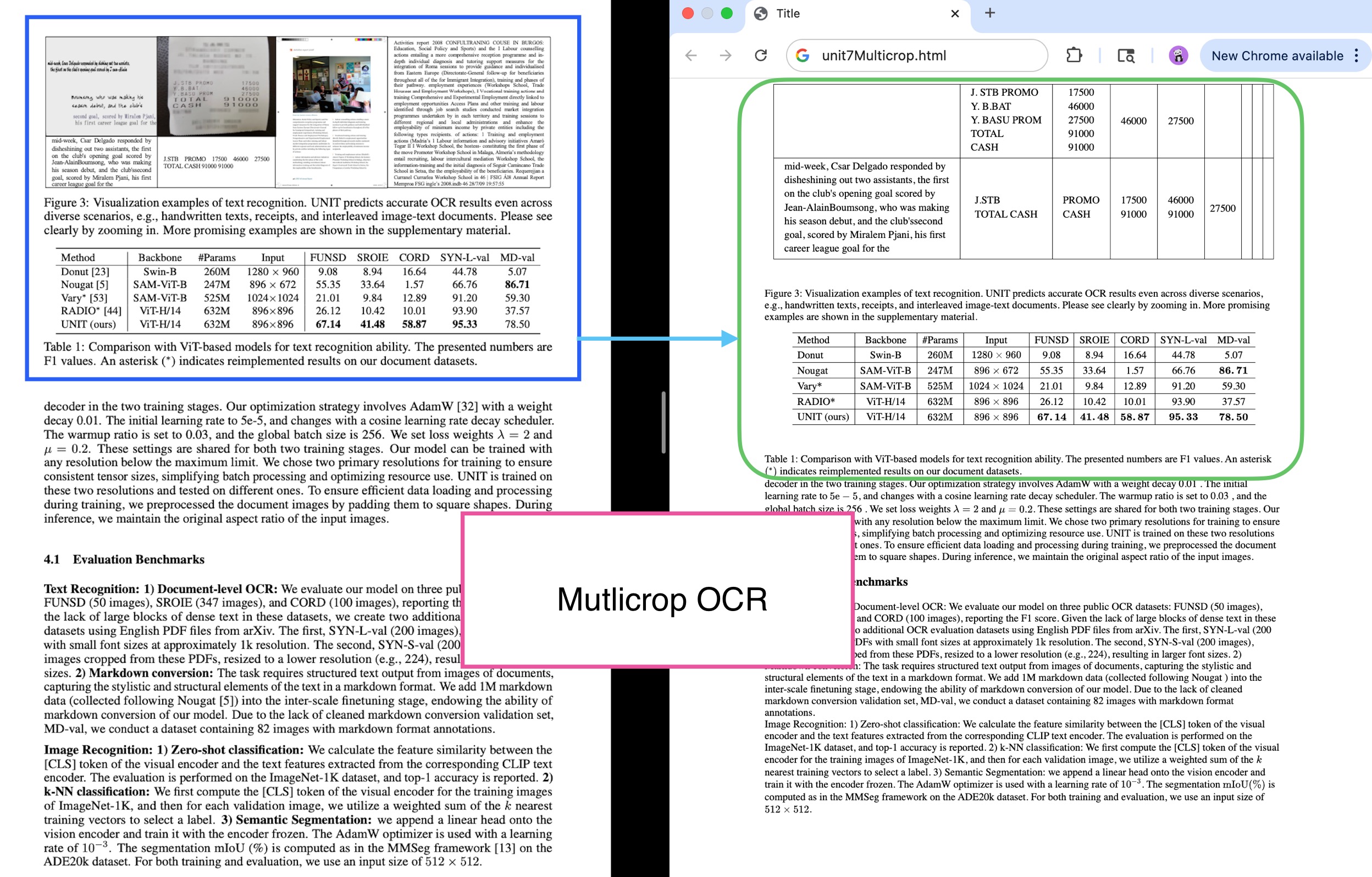
- Adds dynamic resolution: for ultra-high-res images (e.g., >2K) they use a dynamic multi-crop strategy so details aren’t lost.
- Adds multi-page / batched PDF OCR: the decoder’s token limit is expanded (the paper reports expanding up to
8192tokens in post-training) so it can handle multi-page documents and long outputs.
Why this matters: by only post-training the decoder with targeted synthetic data, the authors add features without re-training the whole huge model. That keeps iteration and deployment costs lower.
Examples
GOT-OCR 2.0 provides powerful document understanding. Here are some examples of how to use it:
Case Study
from PIL import Image
from transformers import AutoModel, AutoTokenizer

# Load model and tokenizer
tokenizer = AutoTokenizer.from_pretrained('ucaslcl/GOT-OCR2_0', trust_remote_code=True)
model = AutoModel.from_pretrained('ucaslcl/GOT-OCR2_0', trust_remote_code=True,
                                 low_cpu_mem_usage=True, device_map='cuda',
                                 use_safetensors=True,
                                 pad_token_id=tokenizer.eos_token_id)
model = model.eval().cuda()

# Process an image file
image_path = 'path/to/your/document.png'

# Extract plain text
plain_text = model.chat(tokenizer, image_path, ocr_type='ocr')

# Extract formatted text (preserves layout, math formulas, etc.)
formatted_text = model.chat(tokenizer, image_path, ocr_type='format')
Rendered HTML Output
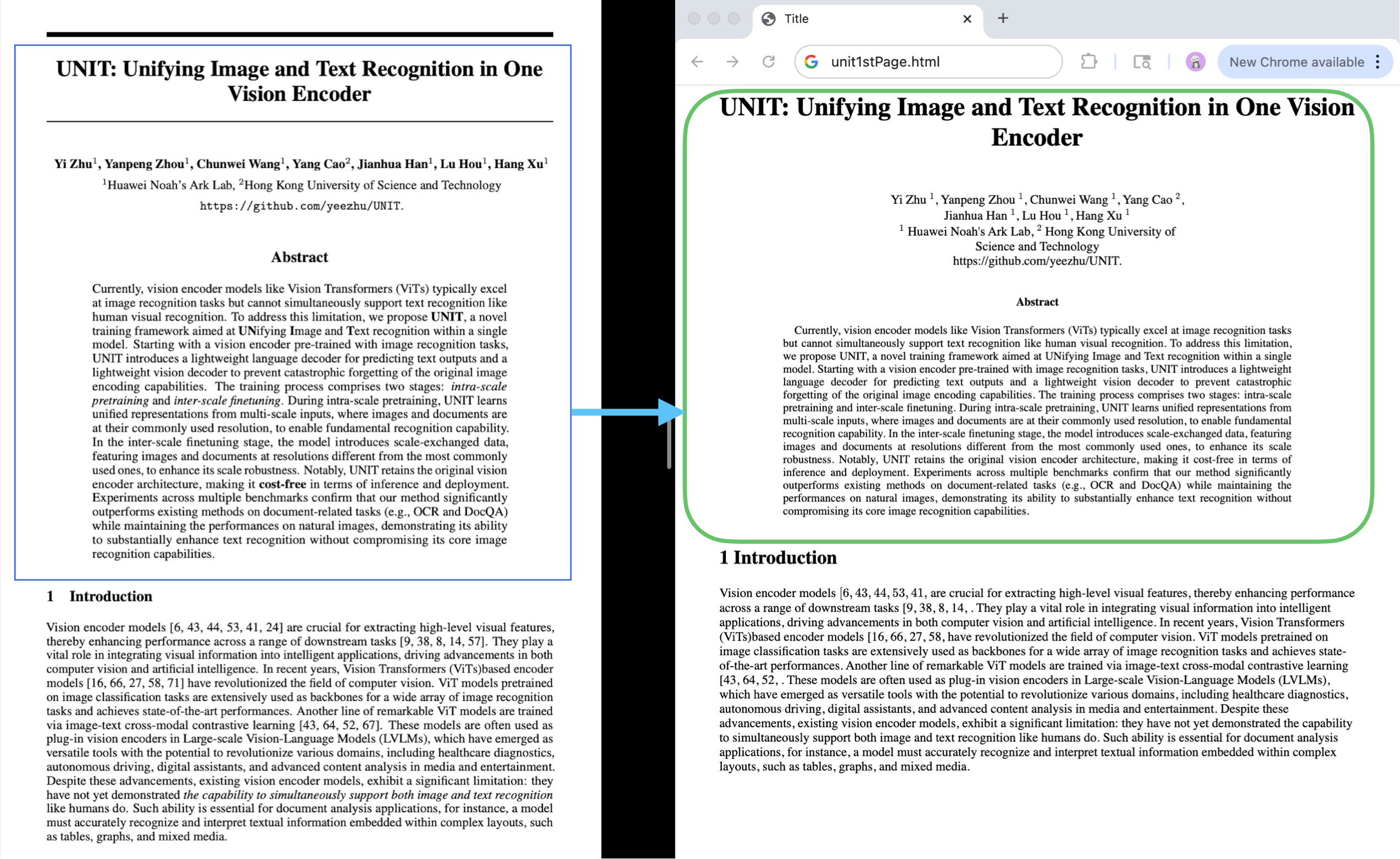
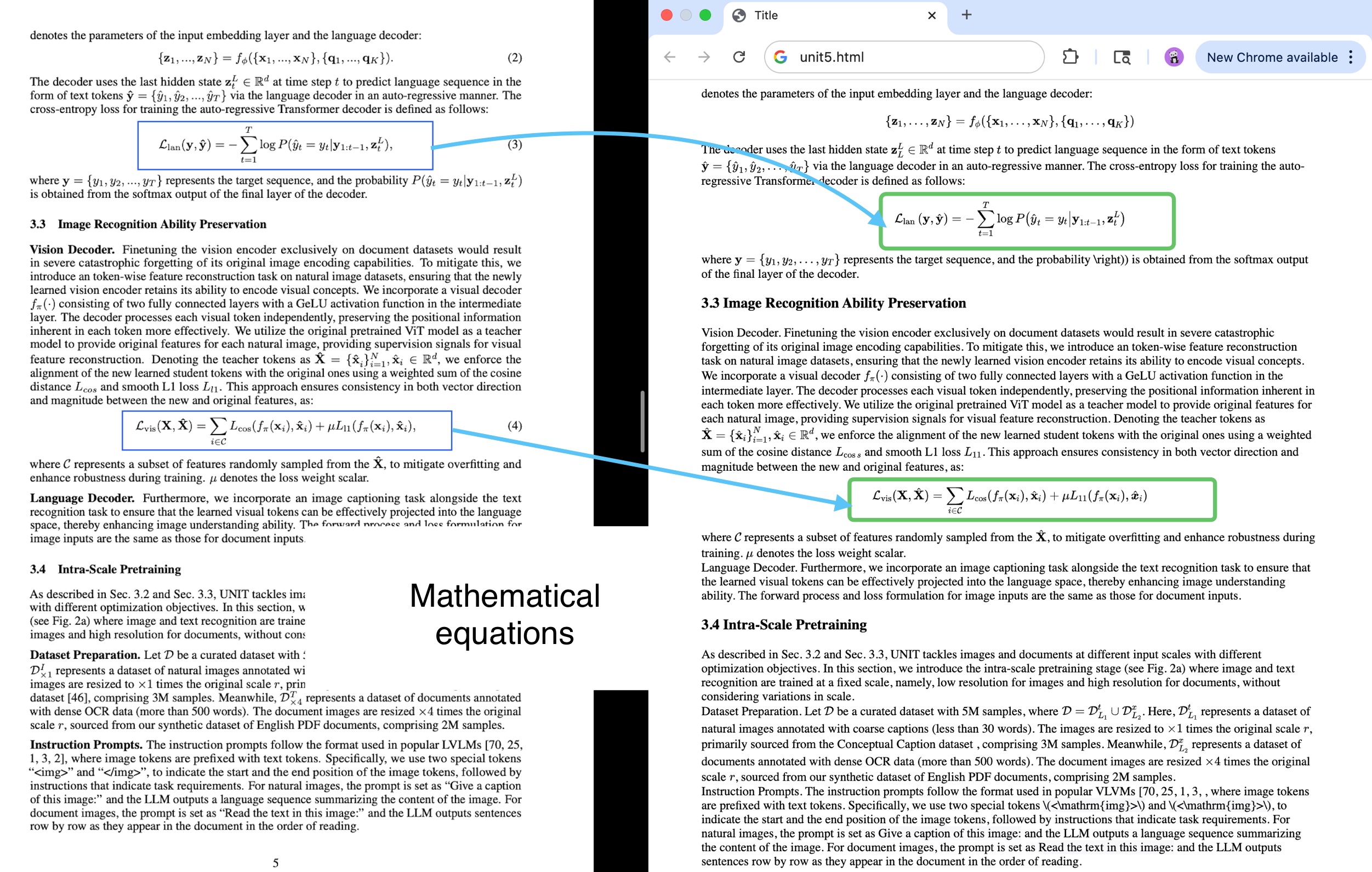
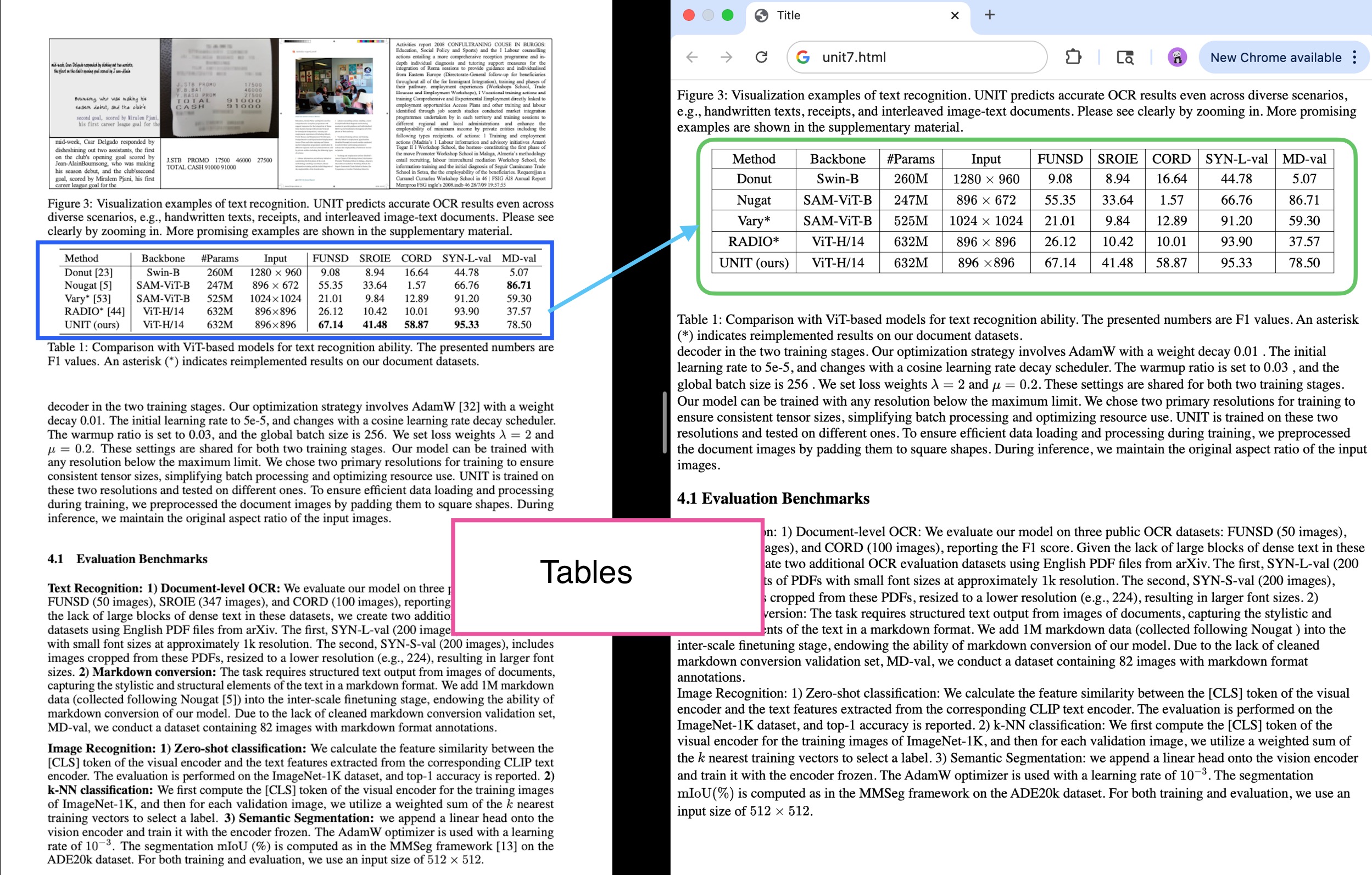
GOT can render complex documents (with math, tables, etc.) directly to HTML:
Multi-crop OCR
For very large or high-resolution documents, use the multi-crop feature:
Final Notes
GOT-OCR 2.0 represents a significant efficiency in document understanding. Unlike traditional OCR systems that require multiple processing steps, GOT offers:
- Single-pass processing for any document type
- Format preservation for complex elements like math, tables, and diagrams
- Flexible output formats including plain text, LaTeX, Markdown, and HTML
- High accuracy even on challenging documents with mixed content
- Efficient processing with a relatively small model (580M parameters)
The examples above demonstrate how GOT can be easily integrated into document processing workflows, providing good results compared to traditional OCR pipelines and even other end-to-end models we tested like PaperMage, DONUT, and Nougat.
Thank you for reading!