How I Built My First Multimodal Video Agent
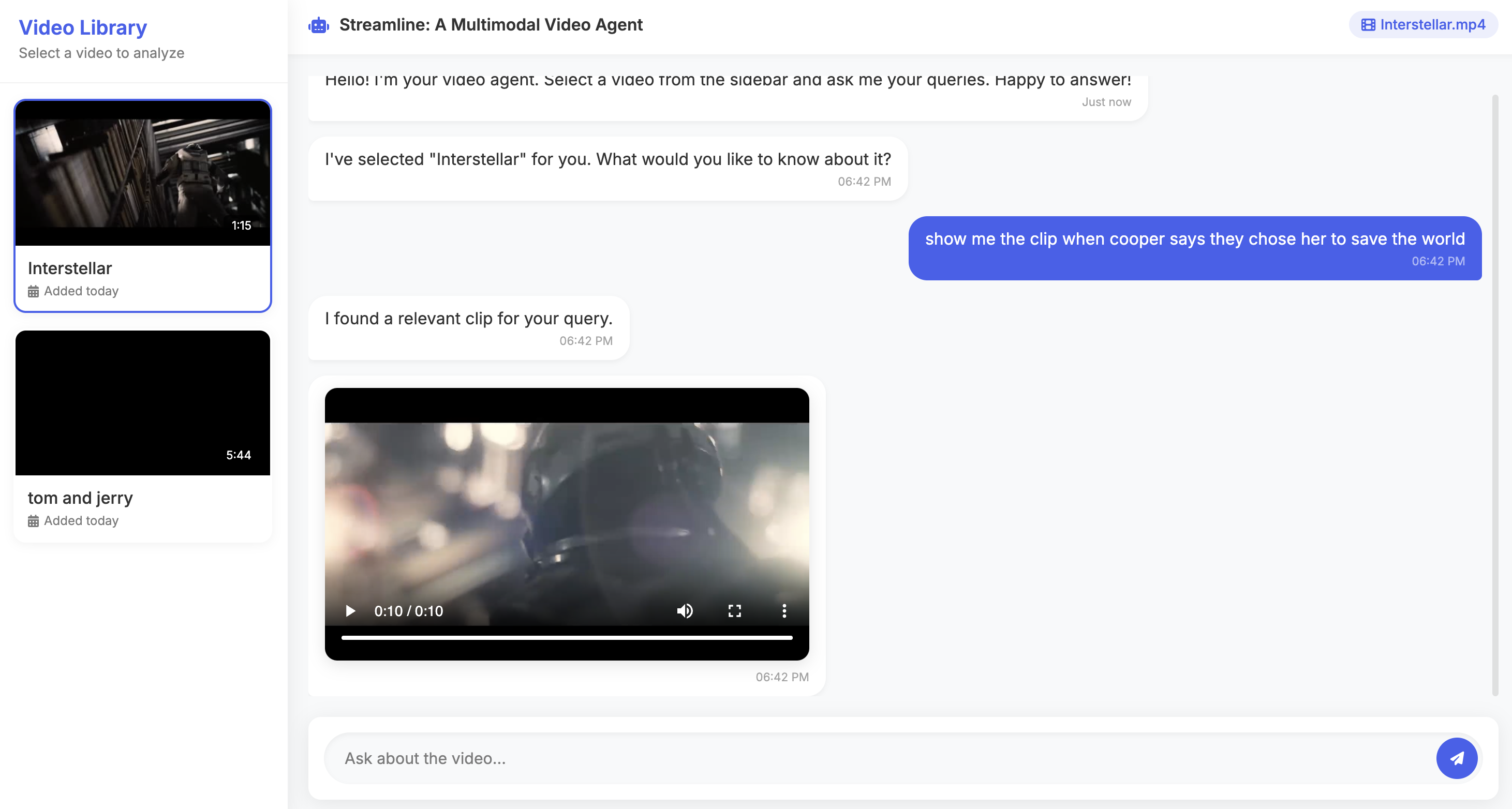
Table of contents
Introduction
We live in a world where video is everywhere — YouTube, Netflix, Zoom calls that nobody ever re-watches (be honest 👀). The problem? Finding that one moment inside hours of video feels like looking for a needle in a haystack… except the haystack is talking, moving, and probably buffering.
That’s where multimodal video agent comes in. It understands your natural language questions and brings you the exact clip you’re looking for — no endless scrubbing or wild guessing.
Imagine being a researcher trying to find a specific interview quote, or a content creator digging through hours of raw footage. Instead of shouting at your screen — “where was that scene again?!” — you just ask agent, and it delivers. Simple. Smart. Sanity-saving.
Agent Overview
So what does this magical agent actually do? Under the hood, agent:
- Breaks your video into frames and audio (yes, it’s that nosy).
- Writes captions for what it sees on screen.
- Transcribes whatever’s being said.
- Lets you ask plain-English questions like “Show me the clip for…”
- Finds the matching clip and hands it back like a well-trained video butler.
In short: you talk, it listens, it searches, it delivers. No more fast-forwarding through an entire movie just to prove your friend wrong about “that one scene.”
Video Processing Pipeline
The pipeline is basically the “assembly line” of our video agent. It takes in raw, messy video and slowly transforms it into something a machine can actually understand (and later search). Think of it like: video goes in → structured data comes out → magic happens. ✨
Here’s how it works step by step:
Frame Extraction
Instead of watching the whole movie, we grab screenshots (frames) at regular intervals — by default, 0.5 frames per second. That’s enough to catch the important stuff without storing thousands of nearly identical stills of Tom just… blinking.
def extract_frames(video_path: str, output_dir: str, fps: float = 0.5):
    """Extract frames from a video at specified FPS"""
    os.makedirs(output_dir, exist_ok=True)
    probe = ffmpeg.probe(video_path)
    video_info = next(s for s in probe['streams'] if s['codec_type'] == 'video')
    duration = float(video_info['duration'])

    frame_count = int(duration * fps)
    frame_files = []

    for i in range(frame_count):
        time_sec = i / fps
        output_file = os.path.join(output_dir, f"frame_{i:04d}.jpg")
        (
            ffmpeg
            .input(video_path, ss=time_sec)
            .filter('scale', 640, -1)
            .output(output_file, vframes=1)
            .overwrite_output()
            .run(quiet=True)
        )
        frame_files.append(output_file)

    return frame_files
Audio Extraction & Transcription
Next, we separate the audio track — because videos aren’t just visuals, they’re also full of conversations, sound effects, and awkward silences. We then feed that audio to a transcription model (here we’re using OpenAI’s gpt-4o-mini-transcribe) so we get searchable text.
def extract_audio_from_video(video_path: str, out_audio_path=None, format='mp3') -> str:
    """Extract audio from a video file using ffmpeg."""
    if out_audio_path is None:
        video_name = os.path.splitext(os.path.basename(video_path))[0]
        out_audio_path = os.path.join(Config.AUDIO_DIR, f"{video_name}.{format}")
    (
        ffmpeg
        .input(video_path)
        .output(out_audio_path, format=format)
        .overwrite_output()
        .run(quiet=True)
    )
    return out_audio_path
def transcribe_audio_chunks(chunks: List[Dict[str, Any]]) -> List[Dict[str, Any]]:
    """
    Transcribe a list of audio chunks using the OpenAI API.
    Args:
        chunks (List[Dict[str, Any]]):
            A list of audio chunk metadata, where each chunk contains:
              - "chunk_path": str, path to the audio file
              - "start_time_seconds": float, start timestamp of the chunk
              - "end_time_seconds": float, end timestamp of the chunk

    Returns:
        List[Dict[str, Any]]: A list of transcription results,
        each containing:
          - "chunk_index": int, index of the chunk
          - "start_time_seconds": float
          - "end_time_seconds": float
          - "transcription": str, transcribed text
    """
    results: List[Dict[str, Any]] = []

    for idx, chunk in tqdm(enumerate(chunks), total=len(chunks), desc="Transcribing chunks"):
        with open(chunk["chunk_path"], "rb") as audio_file:
            response = client.audio.transcriptions.create(
                model=Config.AUDIO_TRANSCRIPT_MODEL,
                file=audio_file
            )

        results.append({
            "chunk_index": idx,
            "start_time_seconds": chunk["start_time_seconds"],
            "end_time_seconds": chunk["end_time_seconds"],
            "transcription": response.text
        })

    return results
Caption Generation
Frames alone are just images. To make them useful, we describe what’s happening in each one using an image captioning model. Basically, the AI plays “narrator” and writes lines like “Tom is running out of the bathroom”.
from tqdm import tqdm

def generate_captions(
    image_paths: list[str],
    prompt: str = Config.DEFAULT_CAPTION_PROMPT,
    model: str = Config.IMAGE_CAPTION_MODEL,
    batch_size: int = Config.DEFAULT_BATCH_SIZE
) -> list[str]:
    """
    Generate captions for a list of images using an OpenAI multimodal model.
    Args:
        image_paths (list[str]): Paths to the images.
        prompt (str): Text prompt to guide caption generation.
        model (str): OpenAI model to use for captioning.
        batch_size (int): Number of images to process per batch.
    Returns:
        list[str]: Generated captions corresponding to each image.
    """
    captions = []

    for i in tqdm(range(0, len(image_paths), batch_size), total=(len(image_paths) + batch_size - 1) // batch_size):
        batch_paths = image_paths[i:i + batch_size]

        for image_path in batch_paths:
            # Encode the image to base64
            image_b64 = encode_image(image_path)
            # Generate caption using OpenAI's chat completions API
            response = client.chat.completions.create(
                model=model,
                messages=[
                    {
                        "role": "user",
                        "content": [
                            {"type": "text", "text": prompt},
                            {
                                "type": "image_url",
                                "image_url": {"url": f"data:image/jpeg;base64,{image_b64}"}
                            }
                        ]
                    }
                ]
            )
            caption = response.choices[0].message.content
            captions.append(caption)
    return captions
Embeddings
Now we’ve got captions (visual text) and transcriptions (spoken text). To make them searchable, we convert both into embeddings — vectors that capture meaning. Think of it as squishing words into math, so when you ask a question like “show me when Tom runs”, the math can point you to the right clips.
def embed_texts(texts: list[str]) -> np.ndarray:
    """Get embeddings from OpenAI for a list of texts."""
    response = client.embeddings.create(
        model=Config.CAPTION_SIMILARITY_EMBD_MODEL,
        input=texts
    )
    # Extract embeddings
    embeddings = [e.embedding for e in response.data]
    embeddings = np.array(embeddings, dtype="float32")
    return embeddings
Agentic Workflow
If the video processing pipeline is the “muscle” of agent, then the Agent System is the brain. It decides what to do, when to do it, and how to do it — all while making sure you get the right clip without breaking a sweat.
We built the agent using an agentic workflow pattern with three simple steps:
- Observe:
- The agent first checks the video’s current state. Is it already processed, or is it still raw footage waiting to be turned into searchable data? This step is like the agent peeking at the dashboard before making any moves.
- Think:
- Based on the video’s status and your query, the agent decides the next action. Should it process the video first, or can it jump straight to extracting a clip? Basically, it’s the part where the agent quietly whispers to itself: “Hmm… what’s the smartest move here?”
- Act:
- Finally, the agent executes the chosen function: either process the video to build indices and transcripts or extract the clip that matches your query. Think of it as the agent rolling up its sleeves and getting stuff done.
Here’s a simplified look at the workflow in action:
def video_agent(user_query: str, video_path: str, max_iterations: int = 3) -> str:
    """
    Agentic workflow to process a video and extract a clip based on user query
    """
    system_prompt = """You are a video agent that helps extract relevant clips from videos based on user queries.
    Respond with EXACTLY ONE of these formats:
    1. FUNCTION_CALL: function_name|function_parameters
    2. FINAL_ANSWER: [clip_path]

    You need to determine which tool to use based on the user query and available inputs.

    Tools:
    1. process_video(video_path): Build search indices and transcribe audio.
    2. get_video_clip_from_user_query(video_path, query): Extract a clip from a processed video.

    # Current Status:
    - Video processing: {video_status}
    - Next action: {action_needed}

    Rules:
    - If the video isn’t processed yet, always process it first.
    """

    iteration = 0
    while iteration < max_iterations:
        video_processed = is_video_processed(video_path)
        prompt_filled = system_prompt.format(
            video_status="PROCESSED" if video_processed else "NOT PROCESSED",
            action_needed="Extract clips" if video_processed else "Process video first"
        )
        response = client.models.generate_content(
            model="gemini-2.0-flash",
            contents=prompt_filled + f"\n\nQuery: {user_query}"
        )
        response_text = response.text.strip()

        if response_text.startswith("FUNCTION_CALL:"):
            func_name, params = parse_function_call(response_text)
            result = function_caller(func_name, params)
        elif response_text.startswith("FINAL_ANSWER:"):
            return response_text.split(":", 1)[1].strip()
        iteration += 1
    return "Maximum iterations reached without a final answer."
💡 Quick takeaway: The agent keeps looping between observe → think → act until it either finds the clip or gives up after a few tries (we like to think it’s persistent, not stubborn 😉).
FastAPI Integration
Now that we have a smart video agent, we need a way to talk to it from the web. Enter FastAPI — a modern, fast Python framework that makes creating REST APIs almost too easy. Think of it as the bridge between your browser and the brainy agent doing all the heavy lifting.
How it Works
We start by creating a FastAPI app and defining a few data models to handle requests and responses:
- Query Request:
- The user sends a query (like “Show me the clip for…”) along with the video filename.
- Query Response:
- The API responds with a message and, if available, the clip path and filename.
# Create FastAPI app
app = FastAPI(title="Video Agent Chat")

# Models for API
class QueryRequest(BaseModel):
    query: str
    video: str

class QueryResponse(BaseModel):
    message: str
    clip_path: Optional[str] = None
    clip_filename: Optional[str] = None
The main /query endpoint is where the magic happens. When a request comes in:
- FastAPI checks if the video exists.
- It sends the query to the video agent.
- The agent returns the clip path (or a polite failure message if nothing matches).
- FastAPI sends back a JSON response with the clip info.
@app.post("/query", response_model=QueryResponse)
async def process_query(query_request: QueryRequest):
    try:
        video_path = os.path.join(Config.VIDEO_DIR, query_request.video)
        if not os.path.exists(video_path):
            raise HTTPException(status_code=404, detail=f"Video {query_request.video} not found")

        clip_path = video_agent(query_request.query, video_path)
        clip_filename = os.path.basename(clip_path) if clip_path else None
        if clip_path and os.path.exists(clip_path):
            return QueryResponse(
                message=f"I found a relevant clip for '{query_request.query}'",
                clip_path=clip_path,
                clip_filename=clip_filename
            )
        else:
            return QueryResponse(message=f"I couldn't find a relevant clip for your query.")
    except Exception as e:
        return QueryResponse(message=f"An error occurred: {str(e)}")
Serving Thumbnails & Clips
FastAPI also helps serve video assets directly to the frontend:
- Thumbnails: Quickly show a snapshot of the video.
- Clips: Stream or download the extracted clips.
@app.get("/thumbnail/{video_name}")
async def get_thumbnail(video_name: str):
    thumbnail_path = generate_thumbnail(video_name)

    if os.path.exists(thumbnail_path):
        return FileResponse(thumbnail_path)
    else:
        default_thumbnail = os.path.join("static/thumbnails", "default.jpg")
        if os.path.exists(default_thumbnail):
            return FileResponse(default_thumbnail)
        else:
            raise HTTPException(status_code=404, detail="Thumbnail not found")

@app.get("/clips/{filename}")
async def get_clip(filename: str):
    file_path = os.path.join(Config.CLIPS_DIR, filename)
    if not os.path.exists(file_path):
        raise HTTPException(status_code=404, detail=f"Clip {filename} not found")
    return FileResponse(file_path)
FastAPI makes your agent accessible via HTTP, so the frontend can query videos, get clips, and display thumbnails — all without the user ever touching the command line.
Final Notes
Building a Multimodal Video Agent has been a great learning experience — from splitiing videos into frames and audio chunks to wiring up FastAPI and finally seeing the agent answer queries.
What started as a messy set of scripts slowly turned into a full-fledged pipeline that can watch, listen, and understand videos — and then serve you the exact clip you asked for. Pretty neat, right?
This project is just the first step. There’s plenty of room to grow.
What’s Next (Future Work)
This blog is Part 1 of the Multimodal Video Agent series. In the upcoming posts, we’ll level up the agent with more multimodal powers:
- Ask through an image – Upload an image and let the agent find where that frame (or something visually similar) appears in the video.
- Ask a question about an image – Not just matching the image, but querying the agent about what’s happening in that frame.
Stay tuned! Keep Learning!