Fine-Tune Mistral-7B Model with LoRA (Low Rank Adaptation): Sentiment Classification
Everything You Need to Know About Parameter Efficient Fine-Tuning (PEFT)
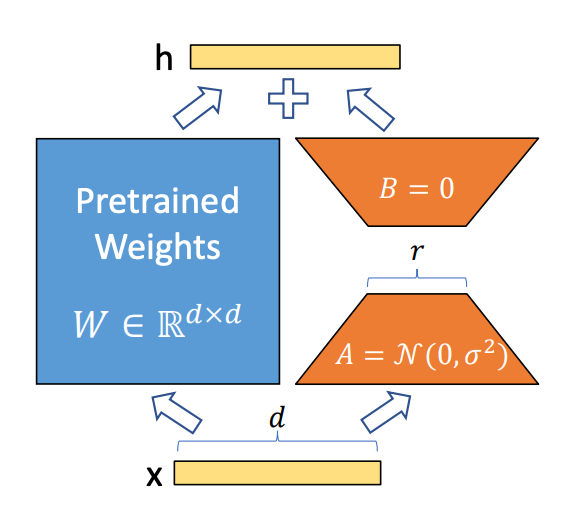
Table of contents
- Introduction
- What is Post-Training of LLMs?
- Understanding Supervised Fine-Tuning (SFT)
- Problems with Full Fine-Tuning
- PEFT: Parameter-Efficient Fine-Tuning
- What is LoRA? Why Do We Use It?
- Mathematics Behind LoRA
- Code Walkthrough: Fine-Tuning Mistral 7B using LoRA
- Monitoring Training with Weights & Biases
- End Notes
- References
Introduction
Large Language Models (LLMs) are initially trained on vast, different text corpora scraped from the internet. This pre-training phase teaches them statistical patterns in language, primarily through next-token prediction. While this equips them with general language understanding and text-generation abilities, it does not make them inherently capable of following instructions, being helpful, or bypassing unsafe responses.
This is where post-training comes into play. Post-training is a crucial refinement phase that transforms a raw, completion-based LLM into an instruction-following assistant. It aligns the model to behave in a more functional, safe, and human-aligned way. The primary technique used here is Supervised Fine-Tuning (SFT), which prepares the model for responding to human instructions clearly and correctly.
What is Post-Training of LLMs?
Post-training is the stage that refines a pre-trained language model into a competent assistant. The key goal is to align the model’s behavior with the principles of HHH alignment — Helpful, Harmless, and Honest outputs.
This process typically starts with Supervised Fine-Tuning (SFT), where the model is trained on carefully curated instruction-response datasets. Examples include prompts like “Summarize this article for a 5th grader” or “Write Python code to sort a list,” along with ideal responses. These teach the model to follow instructions rather than just complete text.
If you skip post-training, you’ll see that the model:
-
Treats every input as a free-form text completion
-
Delivers verbose or irrelevant responses
-
Mimics biased or toxic internet text
-
Struggles with tasks like preparing a professional email or answering factual questions directly
Post-training is a highly efficient process — it consumes only about 2% of total model training compute but enables the practical usefulness of the model.
Effect of SFT on Model Behavior
| Capability | Pretrained Model | Post-Trained Model |
|---|---|---|
| Instruction Following | Ignores specific instructions | Follows tasks directly |
| Clarity & Focus | Rambling, generic | Concise, focused |
| Knowledge Access | May cite irrelevant or biased info | Provides reliable, relevant answers |
| Toxicity & Bias | Reflects internet data | Reduced via curated examples |
| Assistant Role Behavior | No role awareness | Understands and fulfills assistant tasks |
How Much Compute Does Post-Training Need?
Compared to pretraining (which can take months and thousands of GPUs), post-training is much cheaper:
- SFT and PEFT use ~2% of the compute
- LoRA can fine-tune a 7B model with a single A100 GPU
This makes it practical for real-world customization of LLMs.
Understanding Supervised Fine-Tuning (SFT)
Supervised Fine-Tuning (SFT) is one of the most effective and widely used methods to align a pretrained LLM with specific human-centric tasks. The objective of SFT is to teach the model how to behave more like a helpful assistant by using a dataset composed of carefully curated instruction-response pairs.
These pairs are designed to represent tasks a human might ask, along with the ideal, contextually appropriate answer. This could include:
- Summarizing articles for different reading levels
- Writing or debugging code
- Explaining complex topics in simple language
Why do we need SFT?
Because the raw pretrained model is simply a statistical text generator. It doesn’t know how to follow instructions, prioritize clarity, or avoid harmful outputs. By contrast, SFT helps the model:
- Understand the task embedded in the prompt
- Generate direct, helpful responses
- Develop the ability to communicate safely and responsibly
Notable Datasets Used in SFT:
- OpenAssistant Conversations – Real human queries for assistant-style behavior
- Anthropic’s HH-RLHF Pre-SFT – Dialogues annotated for helpfulness and safety
- InstructGPT Dataset – Used by OpenAI to teach instruction-following via demonstrations
SFT is the first and arguably most important step in transforming a base LLM into a powerful assistant.
Problems with Full Fine-Tuning
Although full fine-tuning may seem like the most thorough way to adapt a model to a new task, it’s often impractical and wasteful, especially with very large models like Mistral, LLaMA, or GPT-4.
Full fine-tuning involves updating every parameter in the model — which for a 7B model, means 7 billion weights. This leads to a series of challenges:
- Massive Compute Requirement: You need high-end GPUs (like A100s or H100s), often in parallel, to train a model end-to-end. Many organizations can’t afford this.
- Storage Explosion: Every checkpoint of the model could be ~14GB. For multiple tasks, this quickly becomes unmanageable.
- Inflexibility: Each new task or dataset requires a new fully fine-tuned model, even if the differences are minor.
- Risk of Overfitting: Especially with small domain-specific datasets, full fine-tuning can distort the model’s general knowledge.
- Hard to Maintain: If you need to adapt your model to different domains (e.g., healthcare, finance, law), full fine-tuning for each use case is inefficient and redundant.
In practice, large AI companies and open-source communities avoid full fine-tuning for these very reasons. Instead, they rely on PEFT techniques like LoRA — which we’ll explore next.
PEFT: Parameter-Efficient Fine-Tuning
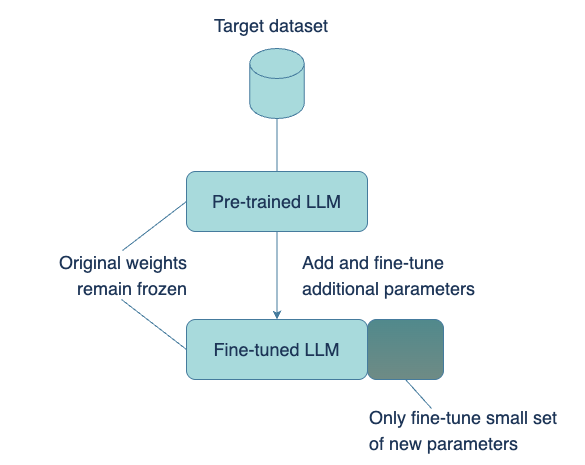
Parameter-efficient fine-tuning (PEFT) is a set of techniques aimed at fine-tuning large pre-trained language models by altering only a small subset of their parameters—rather than adjusting all weights as in full fine-tuning. This approach makes fine-tuning practical even with limited computational resources while still achieving high performance.
How PEFT Works?
-
Freeze the base model weights: The main transformer layers are left unchanged to preserve their general language capabilities.
-
Inject lightweight, trainable components: These could be adapter modules, low-rank matrices (as in LoRA), or learnable prompt embeddings (as in prefix-tuning).
-
Train only the new parameters: Since the number of trainable parameters is significantly reduced, training becomes faster, more memory-efficient, and less prone to overfitting.
To put it in perspective, models like LLaMA-7B have over 7 billion parameters. PEFT methods like LoRA can reduce trainable parameters to just 5–50 million—about 0.1% of the total size—without degrading performance.
This concept was first presented in the 2019 paper Parameter-Efficient Transfer Learning for NLP by Neil Houlsby et al., which introduced adapter modules—small neural layers inserted between the layers of a frozen transformer. These adapters are the only components that are trained, enabling task-specific learning without modifying the shared backbone model.
Advantages of PEFT:
- Efficiency: Minimal hardware and compute required
- Reusability: Multiple adapters can be trained for different tasks using the same base model
- Modularity: Adapters can be hot-swapped without retraining the full model
- Robustness: Less risk of catastrophic forgetting or overfitting
HuggingFace’s peft library has turned this concept into a practical toolkit, supporting various PEFT strategies including LoRA, prefix-tuning, and adapters.
We’ll now dive deeper into LoRA—the most popular form of PEFT used in transformer models today.
What is LoRA? Why Do We Use It?
LoRA (Low-Rank Adaptation) improves fine-tuning by introducing trainable low-rank matrices into frozen weight matrices of attention layers. This enables efficient training with minimal parameter updates.
For example, instead of updating a 4096x4096 attention matrix (~16M parameters), LoRA injects two small matrices A and B with dimensions (4096x8) and (8x4096), training only ~65K parameters.
This drastically reduces compute and storage needs while preserving performance.
Mathematics Behind LoRA
The foundation of LoRA (Low-Rank Adaptation) lies in a powerful result from linear algebra called the Eckart–Young Theorem. Introduced in the context of numerical matrix approximations, this theorem explains how a high-dimensional matrix can be closely approximated using a lower-rank matrix—minimizing the difference between them.
The Eckart–Young Theorem
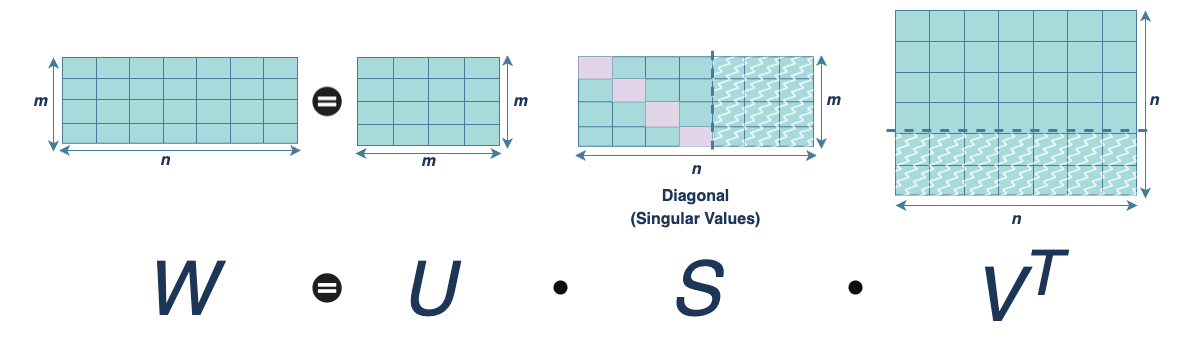
This theorem states that the best rank-k approximation of a matrix W, where
in terms of minimizing the Frobenius norm, is obtained by truncating its Singular Value Decomposition (SVD).
Where,
represents the top-k singular vectors and singular values from the full decomposition of W.
Frobenius Norm: A Measure of Approximation
The Frobenius norm quantifies how close our approximation
is to the original matrix W:
It calculates the element-wise squared error between matrices.
Why This Matters in Transformers
In large language models, the most compute-intensive parameters reside in the attention layers, which often contain very large matrices, (e.g. 4096 x 4096). Updating these weights directly during full fine-tuning is computationally expensive and memory intensive.
LoRA provides an elegant workaround. Instead of directly training the full update matrix,
we express it as the product of two smaller, trainable matrices:
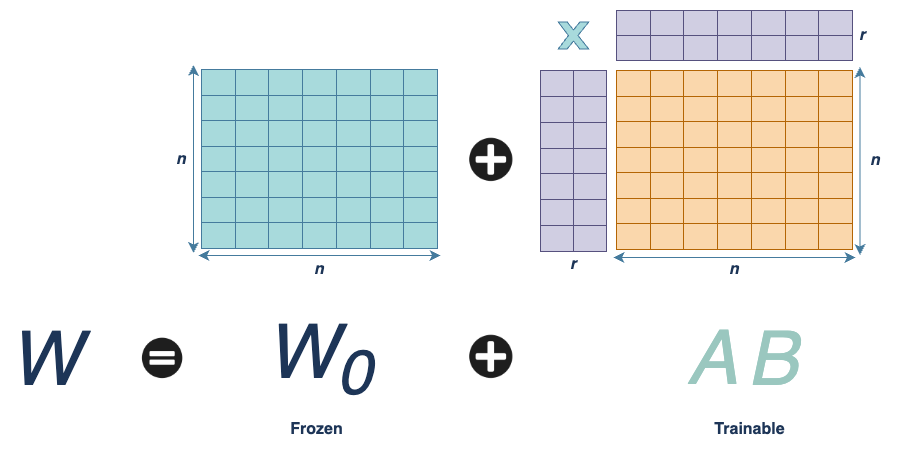
Where:
and,
With
this formulation drastically reduces the number of trainable parameters.
Example:
-
A full 100 x 100 matrix: 10,000 parameters
-
LoRA approximation:
- A: 100 x 10
- B: 10 x 100
- Total parameters: 1,000 + 1,000 = 2,000 → 80% reduction
Why It Works
The Eckart–Young Theorem guarantees that this low-rank format is the best approximation (in terms of minimal loss). LoRA thus adapts the model using the most significant directions in weight space while keeping the rest of the pretrained model intact.
Code Walkthrough: Fine-Tuning Mistral 7B using LoRA
This section walks you through a practical implementation of fine-tuning the Mistral-7B language model using LoRA. We’ll cover data loading, model setup, LoRA configuration, training, and inference—explaining every key step and parameter.
Step 1: Import Libraries
import os
from collections import Counter
import torch
from datasets import load_dataset, DatasetDict
from peft import LoraConfig, get_peft_model, TaskType
from transformers import AutoTokenizer, AutoModelForCausalLM, TrainingArguments, Trainer, BitsAndBytesConfig
from trl import SFTTrainer, DataCollatorForCompletionOnlyLM
These libraries are essential for loading data, applying LoRA-based parameter-efficient fine-tuning, managing model/tokenizer, and training workflows.
Step 2: Load and Prepare Dataset
def load_and_prepare_dataset():
    print("Loading dataset...")
    dataset = load_dataset("FinGPT/fingpt-sentiment-train")
    if isinstance(dataset, DatasetDict) and "train" in dataset and "validation" not in dataset:
        train_test_split = dataset["train"].train_test_split(test_size=0.1)
        dataset = DatasetDict({"train": train_test_split["train"], "validation": train_test_split["test"]})
    print(f"Dataset loaded with {len(dataset['train'])} training samples and {len(dataset['validation'])} validation samples")
    return dataset
This function loads the financial sentiment dataset from HuggingFace. If no validation set exists, it splits 10% of the training data into validation.
Step 3: Load Model and Tokenizer
def load_model_and_tokenizer(model_name, cache_dir):
    tokenizer = AutoTokenizer.from_pretrained(
        model_name,
        cache_dir=cache_dir,
        eos_token="<|im_end|>",
        bos_token="<s>",
        pad_token="<pad>",
        additional_special_tokens=["<response>","<response|end>"]
    )
    model = AutoModelForCausalLM.from_pretrained(
        model_name,
        cache_dir=cache_dir,
        device_map="auto",
        torch_dtype=torch.float16,
        attn_implementation="flash_attention_2"
    )
    model.resize_token_embeddings(len(tokenizer))
    return model, tokenizer
We customize the tokenizer by defining special tokens for the instruction-response format. The model is loaded in half precision (FP16) with Flash Attention for faster compute.
Step 4: Apply LoRA Configuration
def apply_lora_config():
    return LoraConfig(
        r=16,
        lora_alpha=32,
        target_modules=["q_proj", "k_proj", "v_proj", "o_proj", "gate_proj", "up_proj", "down_proj"],
        lora_dropout=0.1,
        bias="none",
        task_type=TaskType.CAUSAL_LM
    )
This config injects LoRA layers into multiple transformer components (query, key, value, output projections, etc.).
r: the rank for the low-rank matrices (smaller means fewer parameters)lora_alpha: scaling factorlora_dropout: regularizationbias: we exclude training bias terms to keep it lightweight
Step 5: Preprocess Dataset
def preprocess_data(example):
    prompt = (
        f"Instruction: {example['instruction']}"
        f"Input: {example['input']}"
        f"<response>{example['output']}<response|end>"
    )
    return {"text": prompt}
This formats each example into a single string that includes the instruction, input, and expected response using special delimiters. This improves alignment during SFT.
Step 6: Define Training Arguments
training_args = TrainingArguments(
    output_dir="financial-sentiment-sftmodel-LoRA",
    per_device_train_batch_size=4,
    per_device_eval_batch_size=4,
    evaluation_strategy="steps",
    eval_steps=1000,
    save_strategy="no",
    num_train_epochs=1,
    learning_rate=1e-4,
    fp16=True,
    logging_steps=5,
    max_grad_norm=1.0,
    gradient_accumulation_steps=8,
    gradient_checkpointing=True,
    gradient_checkpointing_kwargs={"use_reentrant": False},
    report_to=["wandb"],
    warmup_ratio=0.1,
    lr_scheduler_type="cosine",
)
These settings control batch size, eval frequency, learning rate schedule, logging, and whether to log to Weights & Biases.
gradient_accumulation_steps: simulates a larger batch sizegradient_checkpointing: saves memory during backpropagation
Step 7: Initialize SFTTrainer
trainer = SFTTrainer(
    model=model,
    args=training_args,
    train_dataset=tokenized_dataset["train"],
    eval_dataset=tokenized_dataset["validation"],
    tokenizer=tokenizer,
    peft_config=lora_config,
    data_collator=collator
)
The SFTTrainer comes from the trl library and simplifies the training loop for instruction-tuned LLMs with support for PEFT.
Step 8: Train the Model
trainer.train()
This starts the training process using our fine-tuned dataset, training loop configuration, and LoRA-modified model.
Step 9: Inference using Fine-Tuned LoRA Model
def infer_sentiment(instruction, text, model, tokenizer, response_template="<response>", max_new_tokens=4):
    input_text = f"Instruction: {instruction}
Input: {text}
{response_template}"
    inputs = tokenizer(input_text, return_tensors="pt").to(torch.device("cuda"))
    outputs = model.generate(
        **inputs,
        max_new_tokens=max_new_tokens,
        do_sample=True,
        top_p=0.99,
        temperature=0.001,
        repetition_penalty=1.1,
        eos_token_id=tokenizer.convert_tokens_to_ids("<response|end>")
    )
    response = tokenizer.decode(outputs[0], skip_special_tokens=False)
    return response.split(response_template)[-1].strip()
This function takes an instruction and input text, formats them into a prompt, tokenizes it, runs it through the model, and returns the generated sentiment classification.
Let’s see an example:
instruction = f'What is the sentiment of this news? Please choose an answer from strong negative/moderately negative/mildly negative/neutral/mildly positive/moderately positive/strong positive.'
text="Starbucks says the workers violated safety policies while workers said they'd never heard of the policy before and are alleging retaliation."

infer_sentiment(instruction, text, model, tokenizer, response_template="<response>")
and it will give an ouput:
moderately positive
Monitoring Training with Weights & Biases
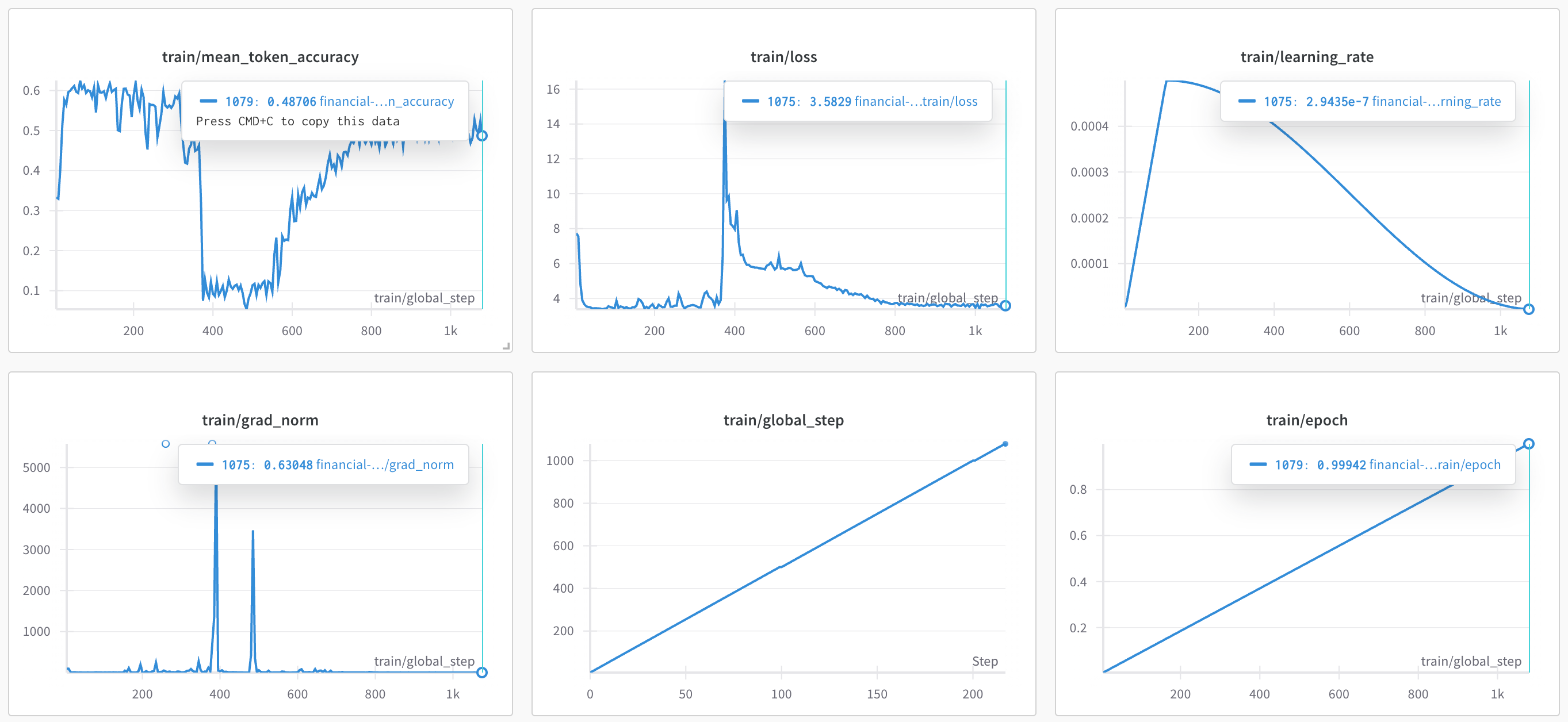
Tracked my fine-tuning progress using Weights & Biases, logging essential metrics like token-level accuracy, loss, learning rate, and gradient norm, along with global step and epoch. These visualizations helped in monitoring training behavior closely.
End Notes
Fine-tuning a large language model like Mistral-7B using LoRA was both a challenging and rewarding experience. From setting up the environment to monitoring training with Weights & Biases, each step provided helpful information about efficiency, stability, and the effectiveness of LoRA adaptation. Although the current results are promising, there is still potential for improvement—additional epochs, hyperparameter tuning, and extensive validation could further elevate the model’s performance.
If you’re thinking about experimenting with LoRA or fine-tuning large models on your own, I hope this walkthrough serves as a solid starting point.
Also you can explore the complete workflow on my GitHub.